Good typing skills open doors. They make writing reports faster, note-taking smoother, and turn everyday computer work from a chore into something effortless. Yet many homeschool families struggle with the how: random online games lead to bad habits, endless drills feel boring, and without proper progression, children hunt-and-peck for years.
Here’s a practical, step-by-step approach that builds confident touch typing while keeping motivation high and integrating beautifully with other subjects like Bible memory.
Step 1: Start with Proper Posture and Home Row Mastery
Before any speed work, establish correct fundamentals. Teach proper sitting posture, hand position, and focus on the home row (ASDF JKL;). Children should learn which finger goes on which key without looking down.
This foundation prevents bad habits that are hard to break later. Spend time here—mastering home row builds confidence quickly.
Step 2: Progress Row by Row with Guided Practice
Don’t overwhelm with the full keyboard at once. Teach one row at a time: home row first, then top row, then bottom row. Use short, focused lessons that combine letters into words and simple sentences.
This gradual build-up lets muscle memory develop naturally without frustration.
Step 3: Move from Letters to Words to Sentences
Once keys are familiar, shift to typing real words, then full sentences. Incorporate meaningful content early — common sight words, spelling lists, or even Bible verses — rather than nonsense drills. This makes practice purposeful and reinforces other learning.
Step 4: Use Timed Drills with Immediate Feedback
Introduce short timed sessions to build speed and accuracy. Real-time feedback on WPM (words per minute) and accuracy percentage helps students see exactly where they need to improve. Focus on accuracy first — speed comes naturally with consistent practice.
Step 5: Track Progress Visually and Set Goals
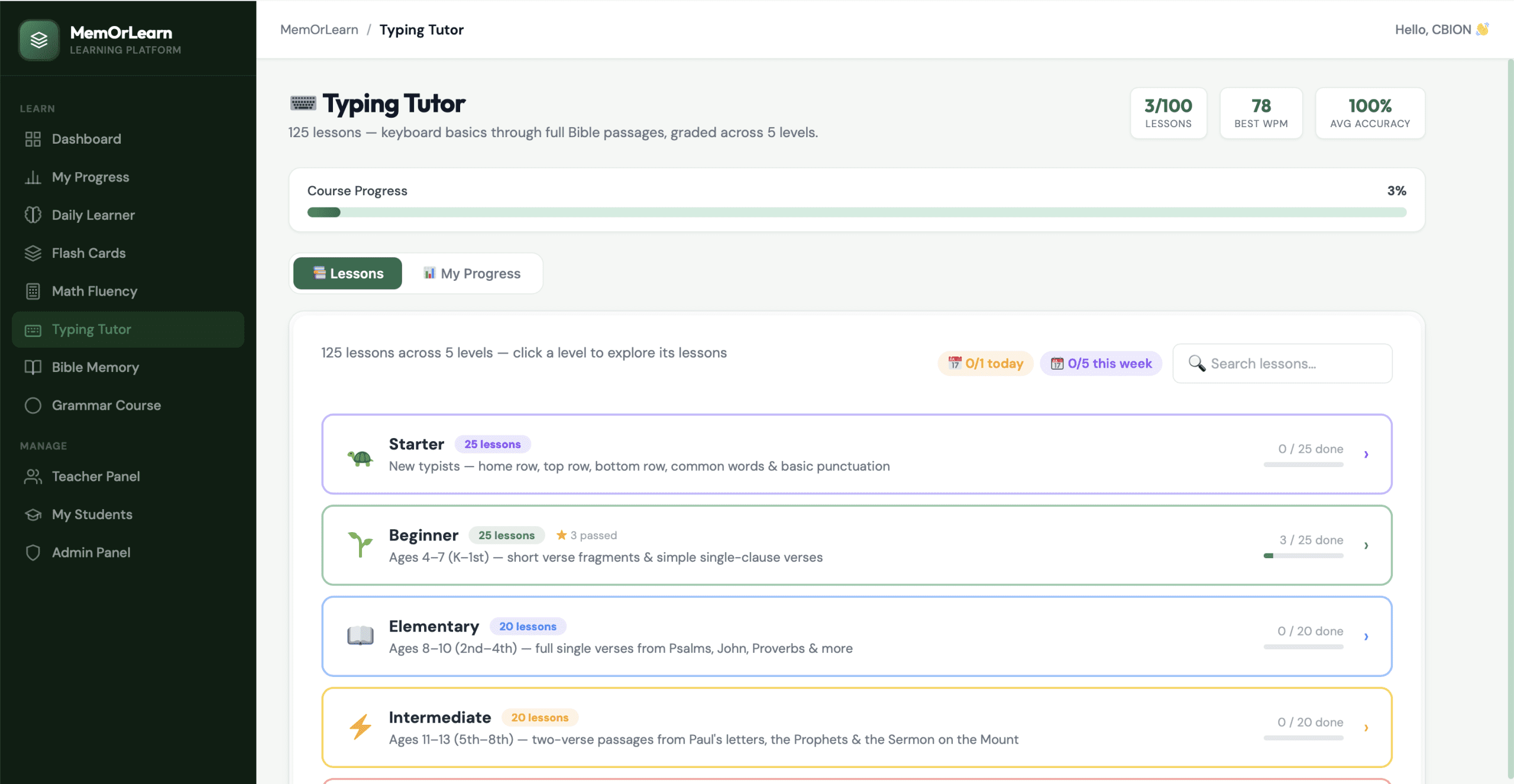
Children stay motivated when they can see improvement. A clear dashboard showing overall progress, best WPM, average accuracy, and lesson completion turns abstract skill-building into something tangible. Celebrate milestones like completing a level or reaching a personal best.
Step 6: Integrate Spaced Review and Daily Consistency
Typing improves through regular, short practice rather than marathon sessions. Daily 5 – 10 minute sessions, with review of challenging keys or words, lead to lasting muscle memory. Spaced practice prevents skills from fading between sessions.
Step 7: Make It Meaningful and Multi-Purpose
Link typing to real work: type journal entries, copy Scripture, or write reports. When typing practice also supports Bible memory or other studies, it feels less like “extra work” and more like a valuable tool for learning.
Bringing the Steps Together
These techniques work on their own, but they shine as part of a structured, progressive system. That’s where MemOrLearn’s Typing Tutor excels. It offers 125 carefully sequenced lessons across 5 levels — from home row basics all the way to full Bible passages.
The program provides real-time WPM and accuracy feedback, visual progress tracking, and meaningful content that reinforces Scripture and other studies. Parents get easy oversight through the dashboard, while students build genuine touch-typing confidence without frustration.
For homeschool families balancing typing with math fluency, Bible memory, grammar, and more, having one integrated platform that handles progression and tracking makes all the difference — freeing you to focus on the bigger picture of education.